Live Dictation Into Any Input Field
Most dictation tools have a hidden step they do not advertise.
You hold a button, speak, and then a beat later, text pastes somewhere. Maybe it pastes into the right place. Maybe it pastes into the wrong one. Either way, there was a gap between your voice and the words landing, and your brain had to hold the uncertainty in that gap.
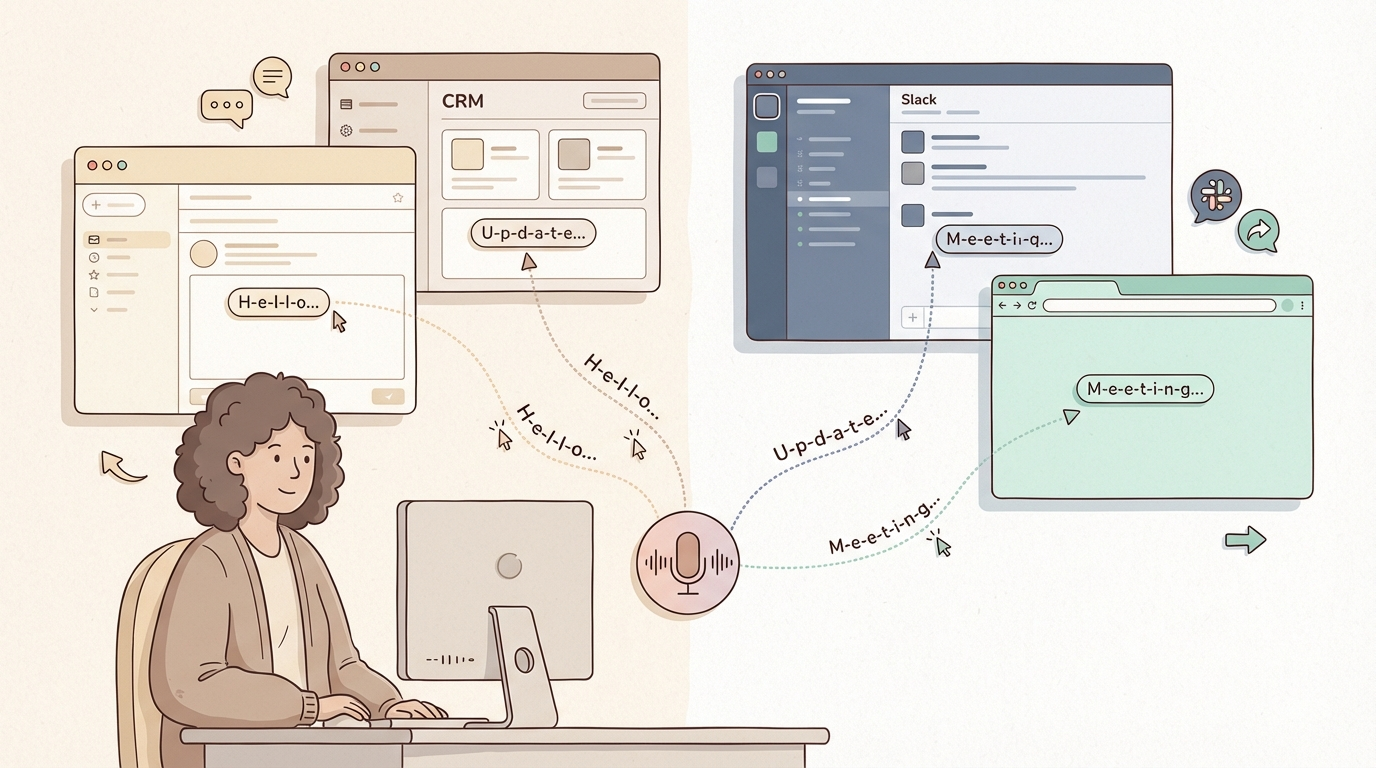
Live dictation eliminates that gap. Text appears where your cursor already is, character by character, as you speak. No paste event. No round-trip. No moment of wondering where it went.
It sounds like a small distinction. It is not.
What “live dictation” actually means
There are two fundamentally different ways a dictation app can work.
Record, then paste. You hold a shortcut and speak into the app. When you stop, the app transcribes the audio and pastes the result into your active field. The delay is usually short, half a second to a second, but the model is stop-then-deliver. The text arrives as a single event after you finish speaking.
Live streaming. The transcription engine runs while you are still speaking. Words arrive in your active field as they are recognized, one by one, in real time. You watch the text appear as your voice produces it.
The second model changes how dictation feels at a fundamental level. You are not speaking into a void and waiting for a response. You are watching your voice turn into text in real time, in the exact place you are already working.
Why it matters more than accuracy
People comparison-shop dictation tools based on accuracy benchmarks. That is the wrong axis for most users.
Accuracy across the top cloud tools in 2026 is close. The difference between 95% and 97% word accuracy on a 200-word dictation is two or three words. You will fix those in a pass anyway.
What you will not fix is the friction model you train yourself into over hundreds of dictation sessions per week.
With record-and-paste, every dictation is a micro-interruption: you stop, you wait, you check that it landed correctly, you continue. That pattern becomes invisible because it is constant. You stop noticing the tax because you pay it on every transaction.
Live streaming removes the check step. The text is already there, already visible, already in the right field. You know because you watched it arrive.
Where “any input field” is the real unlock
The other part of the capability is field coverage.
Some dictation tools work well in their own interface but fail when you try to use them in an arbitrary app. They paste into whatever was focused last, which works until it does not: until focus shifted, until the field rejected the paste, until you are looking at a search bar full of text that was meant for an email.
True any-field streaming means: you put your cursor in a CRM field, a Slack message, a Google Doc, a support ticket, a code comment, a browser address bar, and the dictation lands there. Not pasted after the fact. Streaming in, live, while the field stays active.
This is harder to build than it sounds. It requires the app to inject keystrokes at the system level rather than using clipboard paste. That is why not every tool does it.
What actually does live streaming into any field
Superscribe
Superscribe streams live into any focused input field on Mac and Windows. Hold Shift + F9 on Windows or Option + Shift + Space on Mac, speak, and the words appear where your cursor already is in real time, character by character.
It works in browser fields, native apps, Electron apps, CRMs, email clients, code editors, and anything else that accepts keyboard input. The app injects text at the system level, which is why it reaches fields that paste-based tools miss.
The automatic time tracking is the downstream benefit: every dictation session is logged by project and duration without you starting a timer. If live streaming is the workflow unlock, automatic time capture is what makes it auditable.
Pricing: Free tier. Pro at $9/mo. (Verified March 2026 at superscribe.io)
Wispr Flow
Wispr Flow also streams live into active input fields on Mac and Windows. The field coverage is broad and works in most apps that accept keyboard input.
The differentiator is context awareness: Wispr Flow reads which app you are typing in and adjusts tone and formatting accordingly. Drafting in Gmail gets email-register output. Slack gets something more casual. For users who move across many different communication contexts in a day, this matters.
No automatic time tracking.
Pricing: $15/mo, or $12/mo billed annually. (Verified March 2026 at wisprflow.ai)
Windows Voice Typing
Win + H on Windows 11 activates built-in voice typing. It streams live into active fields and works across most apps.
The ceiling is low: no AI formatting, no custom vocabulary, accuracy that fades on longer sessions. But for the use case of “I want live dictation in any app with zero setup,” it is a real option.
Free. No install required.
Tools that do not do live streaming (but often get compared)
SuperWhisper uses a paste-after model. Excellent software with a large user base, but text arrives as a batch event after you stop speaking. Not live streaming.
Apple Dictation is paste-after. Free, on-device, decent for short inputs.
Buzz is a transcription tool, not a dictation app. You feed it audio files or a microphone session and get a transcript back. No shortcut-to-type workflow.
Dragon Professional does stream live, but not “any field” in the same sense. It works best within apps Dragon is configured to support, and setup overhead is significant.
The one question worth asking
Before you pick a tool, test this: open a field in whatever app you actually work in most, put your cursor in it, and trigger dictation without clicking anything else first.
Does text appear in that field, live, as you speak?
That answer tells you more than any feature comparison chart.
Try Superscribe at superscribe.io
Hold a shortcut. Speak. Text appears where your cursor already is.
Related reading
- Dictation App for Mac That Types Where You Work
- Why Real-Time Dictation Feels More Reliable Than Record-Then-Transcribe
- Best Voice to Text Apps for Windows in 2026
- Best Voice to Text Apps for Mac in 2026
Frequently asked questions
What is live dictation into any input field? It is a dictation model where text streams into whatever app and field you have focused, character by character, in real time, as you speak. No paste event, no app switching, no gap between voice and output.
Which apps support live streaming into any field? Superscribe and Wispr Flow both do this on Mac and Windows. Windows Voice Typing does it for free with more limited accuracy. Most other tools use a paste-after model.
Is live streaming more accurate than paste-after dictation? Accuracy is determined by the transcription engine, not the delivery model. The top cloud tools are comparable in accuracy. The streaming model changes workflow friction, not word error rate.
Does live dictation work in browser fields? Yes, for tools that inject text at the system level. Superscribe and Wispr Flow both work in browser input fields: search boxes, email compose windows, CRM fields, anything in Chrome, Firefox, Edge, or Safari.
Try Superscribe free
Dictate into any app. Track your time automatically. No credit card required.
Get Started