Harvest Alternative for Consultants and Consulting Firms

Harvest is a good product. It has helped consultants and small firms track time and send invoices for almost twenty years.
People who look for a Harvest alternative usually do not have an invoicing problem. They have a different problem: the hours never reach the timesheet in the first place.
It is Friday afternoon and the timesheet is half empty. You spend the next hour going through your calendar, your sent emails and your call history, trying to remember what you did on Tuesday. You find the big meetings. You miss the twelve-minute call with a client, the notes you wrote after it, and the question you answered on the way to the car.
If that sounds familiar, you are not bad at time tracking. The tool expects your day to work in a way that it does not.
What Harvest does well
Harvest is built around a simple order: track the time, then send the invoice. With Harvest you can:
- set up clients, projects and tasks
- start and stop timers on your computer, on your phone or in the browser
- fill in your hours in a weekly timesheet
- record expenses
- turn tracked hours into invoices
- see reports on project budgets and unbilled time
If you start a timer every time you change tasks, Harvest works very well. You can read more on the Harvest website.
The weak point is not the invoice. It is the moment before it, when you have to remember to tell the tool that work has started.
Where consultants lose billable hours
Most consultants do not lose the four-hour workshop. That one is in the calendar. They lose the small pieces between the big ones:
- a client call that was meant to take five minutes and took twenty
- the notes you write right after that call, while you still remember the details
- a call back to agree the scope before work starts
- the update you give a colleague about the project
- a client question that you answer from the car
Each piece feels too small to open Harvest, find the project, pick a task and start a timer. So you plan to log it later. By Friday it is gone.
Here is a simple example. You bill 30 hours a week at €120 an hour. If you miss 10 percent of that time, you lose 3 hours a week, which is €360. Over 42 working weeks, that is more than €15,000.
For management consultants, technology consultants, architects and other firms that bill by the hour, many of these small pieces happen on the phone. The phone is exactly the place where a timer is hardest to use.
A different approach: record the work, and the time follows
Superscribe starts from the other end. You do not tell it that work has started. It records the work itself and counts the time from that record.
Work gets recorded in three ways.
1. Phone calls on your own number
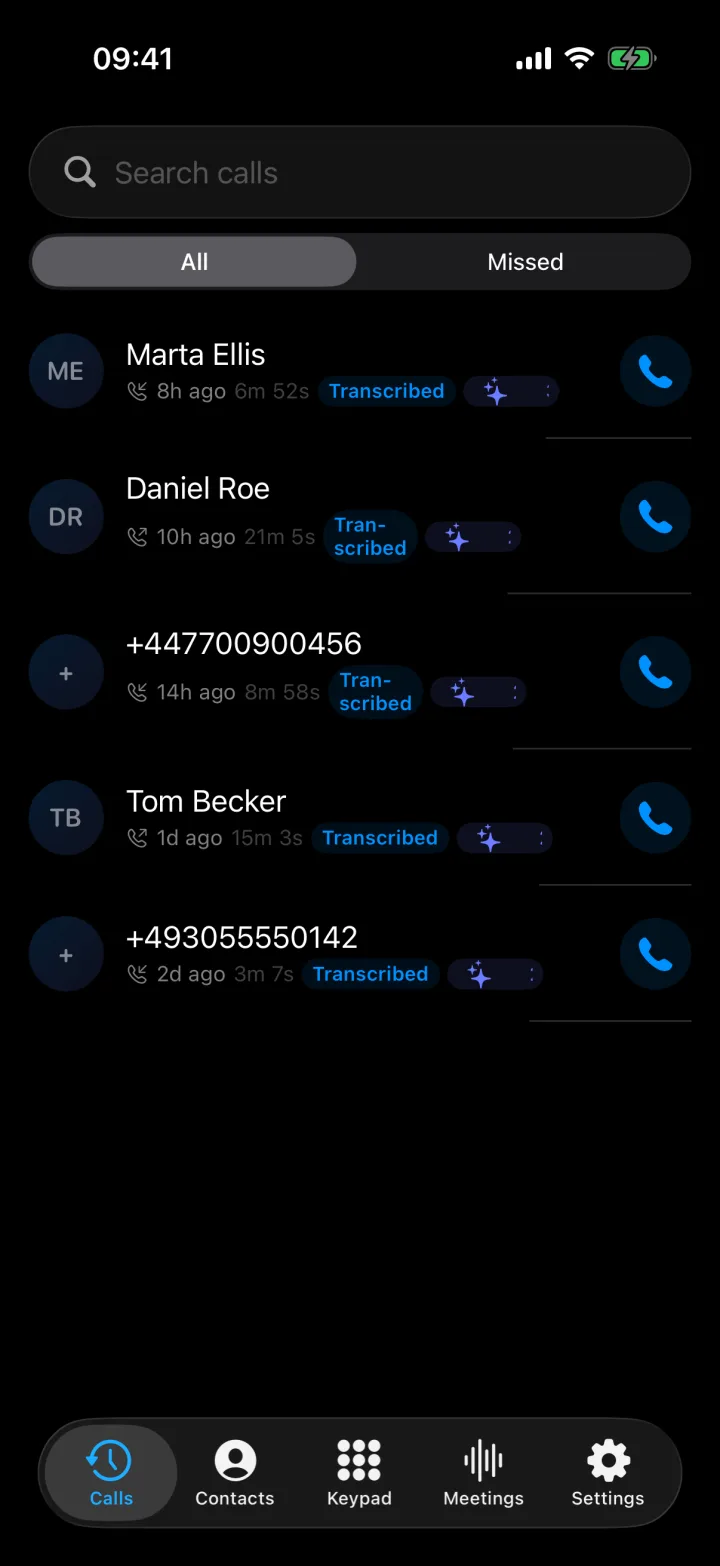
Superscribe Phone is an iPhone app for business calls. You keep your own number and your phone company. You set up call forwarding once on your iPhone, and your calls then ring in the Superscribe Phone app. If you are signed in to the Superscribe app on your Mac or Windows computer, calls ring there too, and you can answer on whichever one is closer.
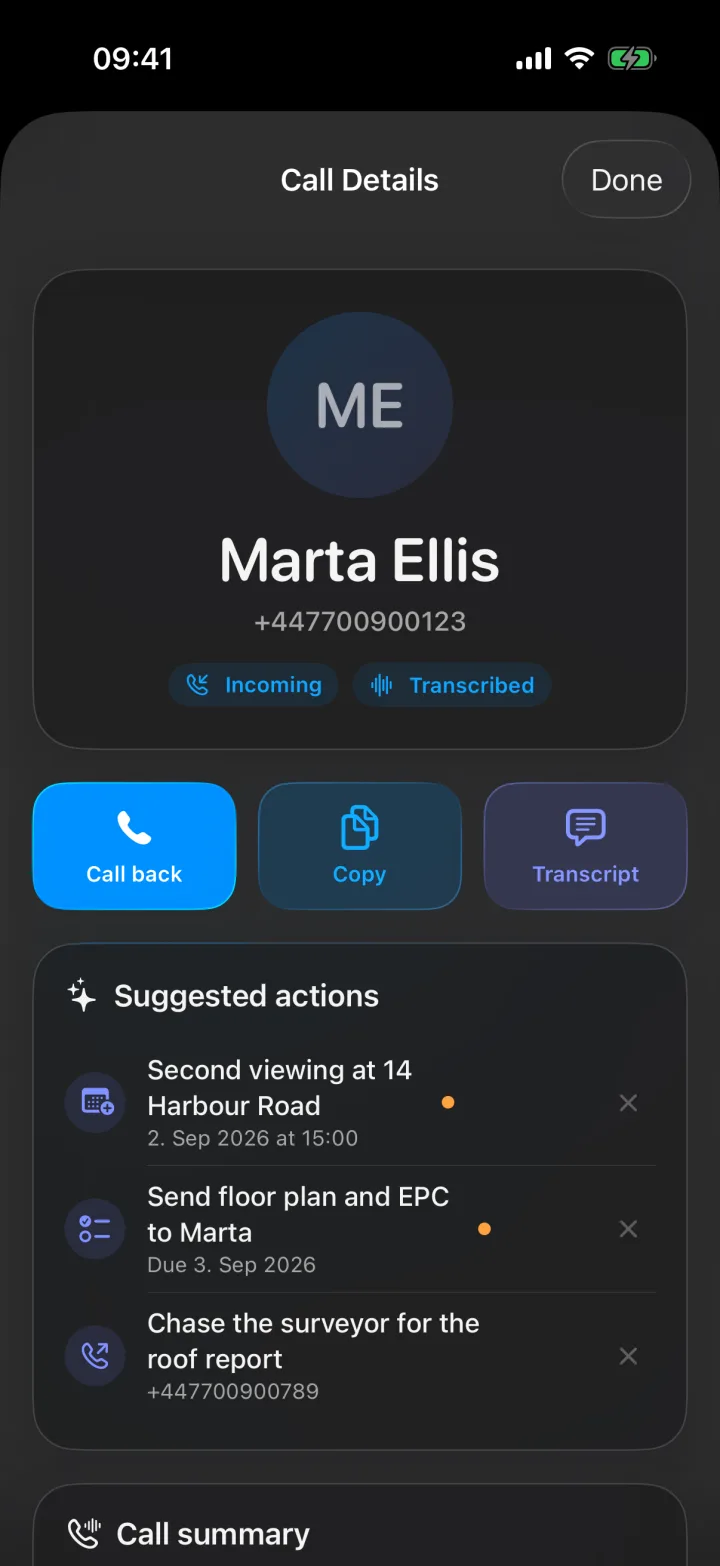
After each call, Superscribe gives you a transcript, a summary and a list of action items. It can also suggest a call back, a calendar event, a reminder, a new contact or a checklist, and you confirm each one with a tap. You write the follow-up to the client yourself, with everything you need in front of you.
Superscribe does not play any recording message to the other person. If the law where you work requires it, tell them that you are recording the call.
2. Meetings
Put your iPhone on the table and start a meeting in the app. Or, for a video meeting, record it from the Superscribe app on your Mac or Windows computer. No bot joins the meeting. You get a transcript with the speakers separated, a summary and the follow-ups. Make sure the people in the meeting know that it is being recorded.
3. Dictation at your desk
On your Mac or Windows computer, press a keyboard shortcut and speak. The words appear in the app where your cursor is: your email, a document, your CRM or a project tool. You can speak the notes after a call instead of typing them, and each dictation also counts as work on that project.
How Superscribe turns recordings into billable time
Every call, meeting and dictation goes into a 30-minute time block. Superscribe then decides which project the block belongs to:
- If you chose a project yourself, it uses that project.
- If the project name or the client name was said, it uses that project.
- If not, it compares what was said with your projects and the work you filed before. When it is sure, it files the block. When it is not sure, it only suggests a project, and you confirm it.
You can move a recording to a different project at any time.
For each project you choose a billing precision, for example 15 minutes, 30 minutes or one hour. The default is 30 minutes, and Superscribe counts the time in steps of that size. You add an hourly rate to each client, and the Reports page shows the hours per project and the estimated amount. You can download a summary report or a detailed report as a PDF to send with your invoice, or copy the totals into your invoicing tool.
Harvest and Superscribe side by side
| Harvest | Superscribe | |
|---|---|---|
| Main job | Timesheets, invoices and project reports | Recording calls, meetings and dictation, and counting the time from them |
| How time gets in | You start a timer or fill in a timesheet | From the calls, meetings and dictation themselves |
| Phone calls | Not recorded | Recorded on your own number, with a transcript, a summary and action items |
| Choosing the project | You pick it every time | Filed from what was said, or suggested for you to confirm |
| Invoices | Built in | Not built in. Reports as PDF with hours and estimated amounts |
| Expenses | Yes | No |
Choose Harvest if
- your main need is invoices, expenses and project budgets in one place
- your team already fills in timesheets every day without trouble
- most of your work happens in long blocks at the computer
- you rarely work on the phone
Choose Superscribe if
- a large part of your client work happens on the phone or in meetings
- you rebuild your week from memory every Friday
- you forget to log short calls and the notes you write after them
- you want call notes and action items without typing them
- you want the time to be counted while you work, not afterwards
You can use both
You do not have to stop using Harvest. Superscribe does not connect to Harvest, but many consultants do not need that. During the week, Superscribe records the calls, meetings and notes. On Friday, you open the Superscribe report, check the hours per project, and enter them in Harvest for the invoice.
The difference is that you check a record instead of rebuilding one from memory.
For consulting firms
Business Voice is the plan for teams. It costs €99 a month per seat. Each seat adds 1,200 minutes, of which up to 250 can be outgoing calls, and the minutes are shared across the team. It also lets you add another person to a live call.
If your firm uses Pipedrive, Superscribe can file each client call there as a completed activity with the summary, the next steps and the transcript. When a call ends with a clear next step, it can also create a follow-up task. Calls with people who are already in Pipedrive are filed automatically, and other entries wait for you to review them. Pipedrive filing is part of every plan.
What it costs
Superscribe Phone is free to download from the App Store. Calls need a paid plan, from €49 a month, with a 30-day money-back guarantee on your first month.
Starter costs €49 a month and includes 600 minutes, of which up to 100 can be outgoing calls. Every plan includes meeting recording, dictation on Mac and Windows, time tracking and Pipedrive filing. Prices are in euros, before VAT. See pricing for the details.
If you only want dictation and time tracking on your computer, without phone calls, Superscribe Pro costs €18 a month.
FAQ
Is Harvest still a good choice for consultants?
Yes. Harvest is a strong choice for consultants who want timesheets, project reports and invoices in one place, especially when the team already logs time as the work happens.
What is the main difference between Harvest and Superscribe?
Harvest asks you to log your time. Superscribe records your calls, meetings and dictation, and counts the time from those recordings.
Can Superscribe replace Harvest completely?
For some consultants, yes, if what you need is hours per project and a report to send with the invoice. Superscribe does not create invoices or track expenses, so firms that need those usually keep Harvest for that part.
Does Superscribe connect to Harvest?
No. You enter the weekly totals from the Superscribe report in Harvest yourself.
Does the other person hear that the call is recorded?
No. Superscribe does not play any recording message. If the law where you work requires it, tell the other person that you are recording the call.
Related reading
If this starts with a call
Try Superscribe Phone on your next business call
Capture the conversation, then turn it into notes, follow-ups, CRM updates, and billable context without rebuilding it from memory.
See the phone workflow