Phone Call to Automatic Summary and Tasks

A phone call is rarely only a phone call.
For an estate agent, a recruiter or a consultant, the call is where the work starts. A client asks for a second viewing. A candidate changes the date they can start. Someone agrees to send a document by Thursday. One small request turns into three tasks.
Then the call ends, the next one starts, and the details start to get lost.
Most call note tools solve the easy part of this problem. They record the conversation and give you a transcript. But after a busy day of calls, the question is not “what was said?” The questions are these:
- What do I need to do next?
- What did I promise on that call?
- What belongs in the CRM?
- Which part of this was work I can bill for?
A transcript is a record. A summary tells you what matters. A task list is what moves the work forward.
The short answer
If you only need a searchable record of your calls, a transcription tool can be enough.
If you want each call to end with a summary, clear next steps and tasks with dates, you need a tool that goes further than the transcript. That is what Superscribe Phone does. It works on your own mobile number, and it can file each business call into Pipedrive for you.
Why a transcript is not enough
A transcript gives you every word in the order it was said. That is rarely what you need an hour later.
After a call you usually want to know a few simple things. What changed? What needs to happen next? Who does it, and by when?
If the tool stops at the words, you still have to read the call again, find the important parts and turn them into tasks yourself. That is why many people try a call notes app for a week and then go back to paper notes and memory. The app saved the conversation, but it did not save them any work.
What should come out of a client call
A useful call summary is more than one block of text. After a client call, you want:
- a short summary of what happened
- the decisions that were made
- the next steps, with the person responsible when that is clear
- tasks with a date, such as a call back, a viewing or a reminder to send a document
- the key details you will need later, such as a price, an address or a deadline
- a record of the call against the right client, so the time can be billed
The last point matters more than it looks. A client call often creates billable work before you touch the keyboard. If the context is lost, you lose the reason behind the work, and sometimes the billing record too.
Why doing it by hand breaks down
Writing up calls by hand works on a quiet day. It does not work on a busy one.
One call becomes four. A client rings while you are driving between viewings. A quick question turns into a new issue. You promise to send something after lunch, and then another call runs long.
By the evening you remember the general outline of the day, but not the exact promises. That is where things go wrong:
- a small task is never written down
- a promise to a client is forgotten
- the follow-up takes twenty minutes because you have to rebuild the call from memory
- the time spent on the call never reaches the invoice
- a decision is lost and has to be discussed again
None of this happens because the work was unimportant. It happens because a call carries a lot of information with no structure, and your other tools cannot use it in that form.
How it works in Superscribe Phone
1. Keep your own number
You keep your own number and your phone company. You set up call forwarding once on your iPhone, and your calls then ring in the Superscribe Phone app. If you are signed in to the Superscribe app on your Mac or Windows computer, the call rings there too, and you can answer wherever you are.
Forwarding sends every call on your number to Superscribe, not only the ones you miss, so the normal phone line on your iPhone does not ring. The person calling you dials your usual number and hears a normal ringing tone. When you call out from Superscribe Phone, the other person sees your own number once you have verified it in Settings.
2. Take the call
Talk as you normally would. Superscribe does not play any recording message to the other person. If the law where you work requires it, tell them that you are recording the call.
3. After the call
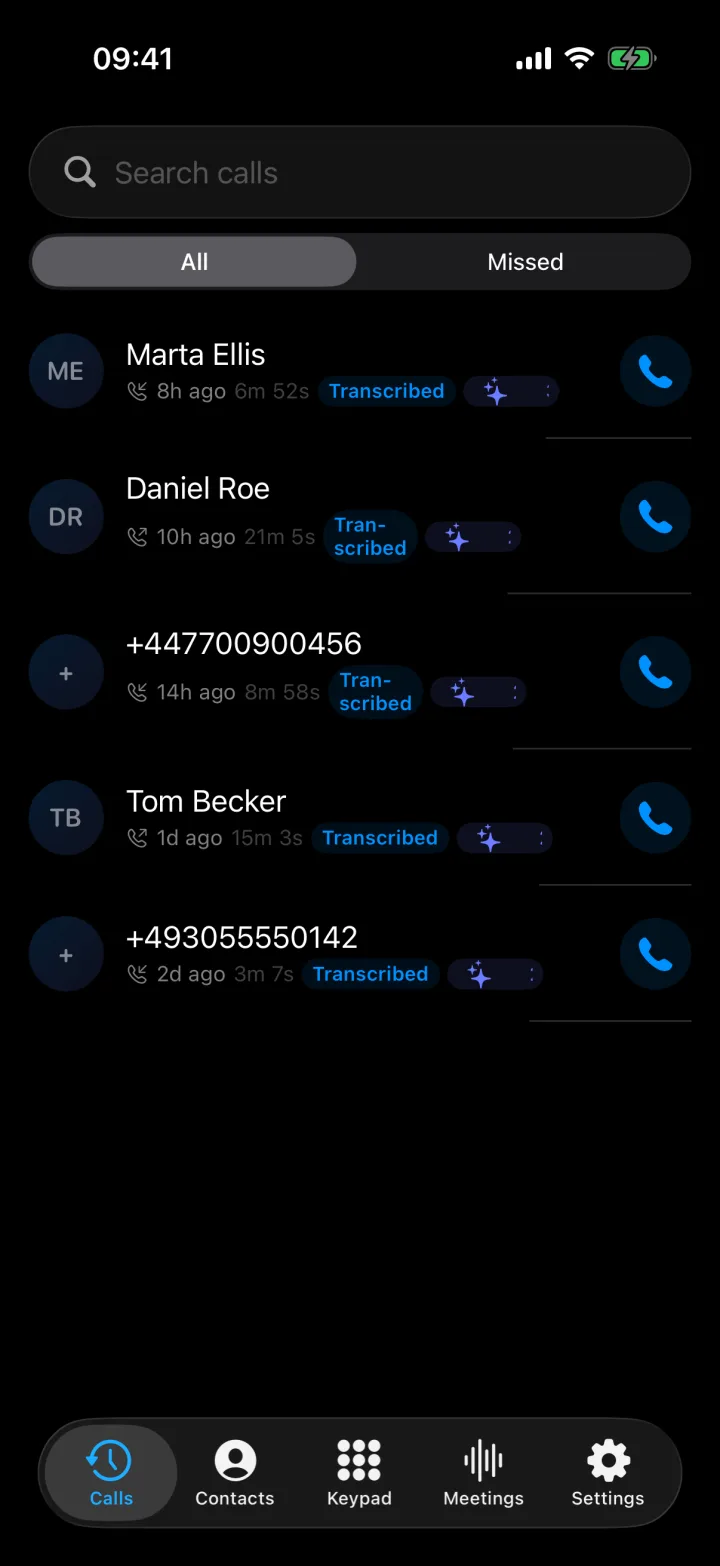
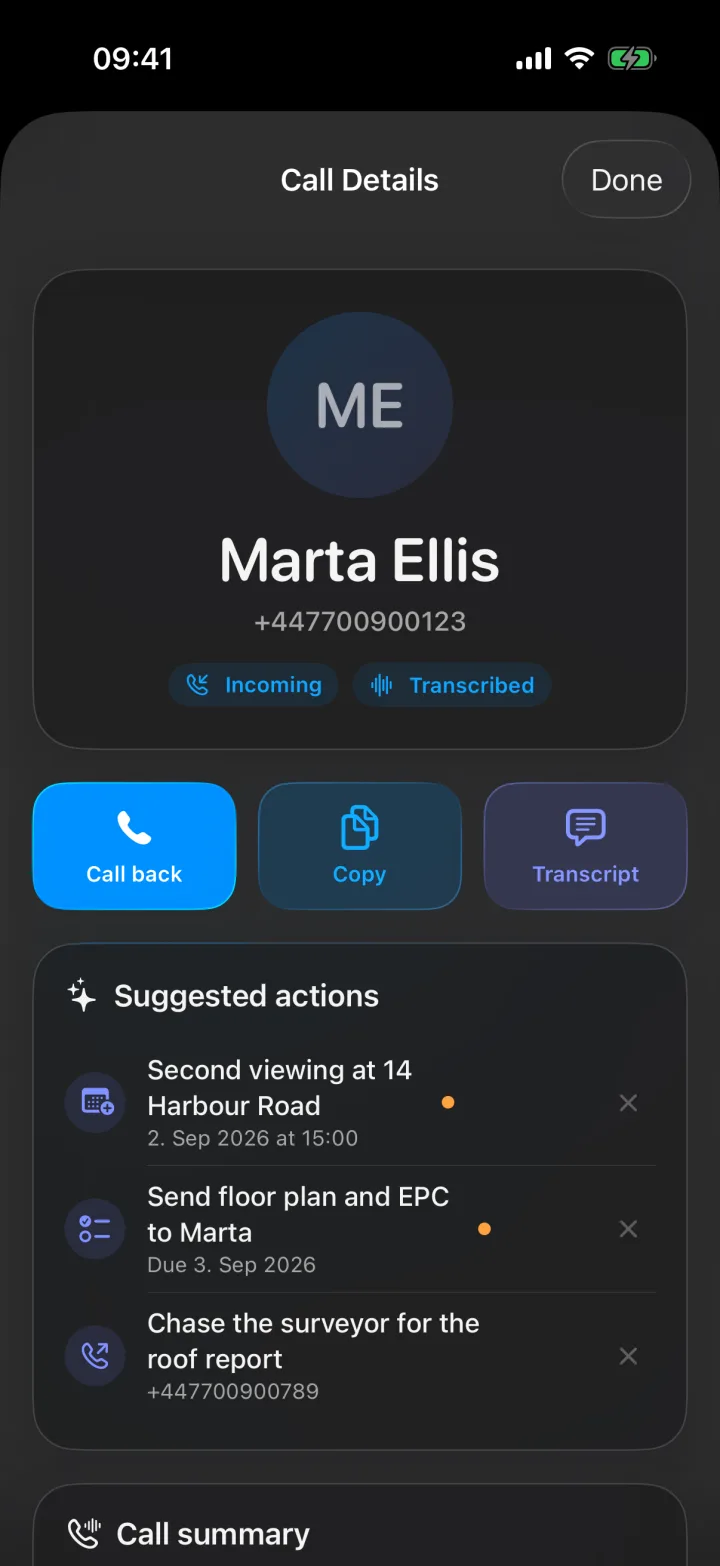
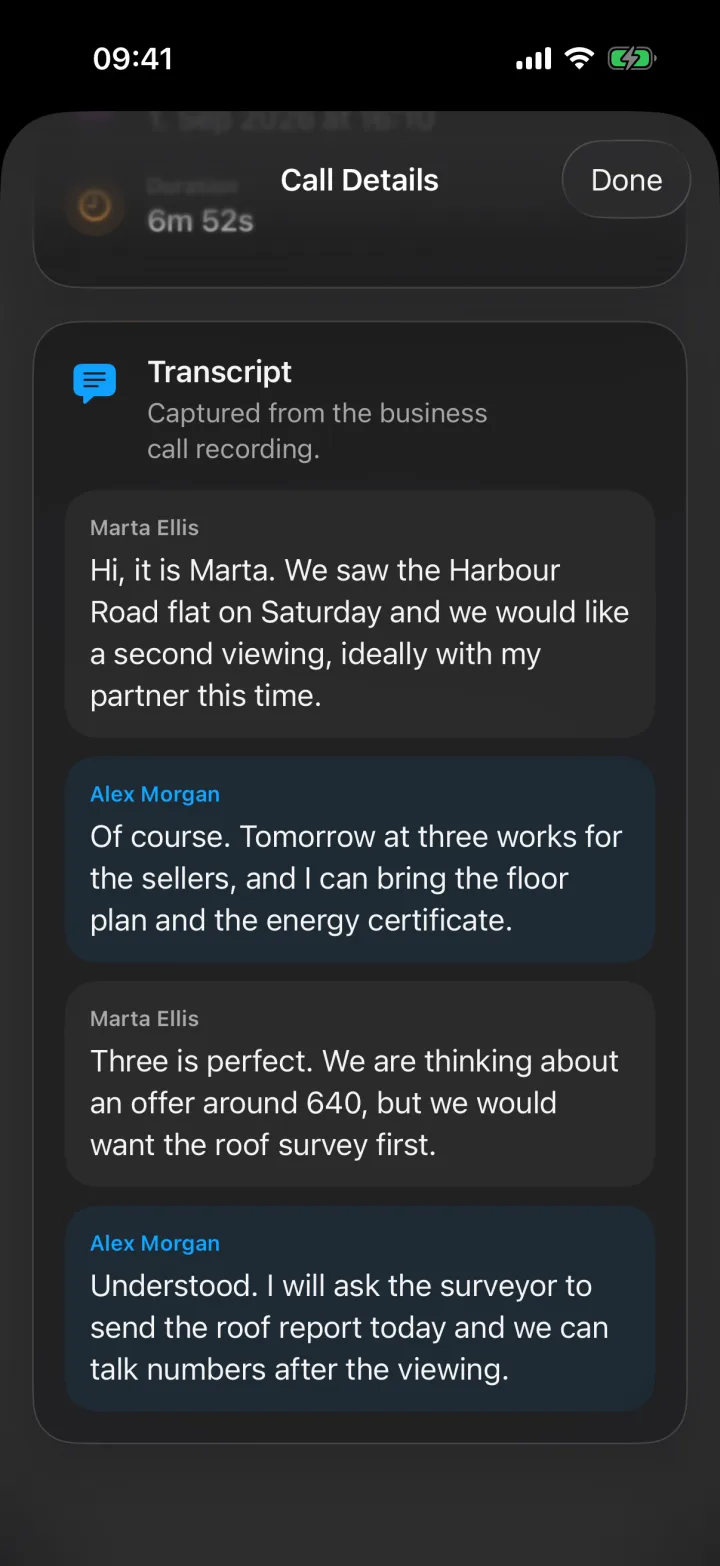
When you hang up, the call is transcribed, and the transcript shows who said what. Superscribe then reads the call and suggests up to four things to do next. Each suggestion is one of five kinds: a call back, a calendar event, a reminder, a new contact to save, or a checklist.
Nothing happens until you tap to confirm a suggestion, and you can dismiss any suggestion you do not want.
4. The notes go into Pipedrive
If you connect Pipedrive, Superscribe writes each business call into it for you. The call is saved as a completed activity with a note that holds a summary, the key details, the next steps and the transcript, in the language the call was in.
If the call ended with a clear next step but no agreed time, Superscribe also adds a follow-up task. If you agreed a date and a time, it adds a meeting activity. Personal calls, spam and wrong numbers are skipped. The full picture is in call notes that go straight into CRM.
An example from a property call
The screenshots above show a call from the demo account. Marta calls about a flat on Harbour Road. She wants a second viewing with her partner. The agent offers tomorrow at three and says he will bring the floor plan and the energy certificate. Marta mentions an offer of around 640, but only after a roof survey. The agent says he will ask the surveyor to send the roof report.
From that call, Superscribe suggests three things:
- a calendar event for the second viewing at 14 Harbour Road
- a reminder to send the floor plan and the energy certificate to Marta
- a call back to the surveyor about the roof report
The price Marta mentioned and her condition about the survey are exactly the kind of details that get lost when a note is written the next day. On the call, they are all in one place.
You still write the follow-up
After each call, Superscribe gives you a summary and a list of action items. You write the follow-up yourself, with everything you need in front of you.
Superscribe does not write or send emails or messages for you. It gives you what you need to write a good one quickly.
Back at your desk
Some follow-up work happens at the computer: a longer note in the CRM, a proposal, or a message you write to the client. The Superscribe desktop app for Mac and Windows includes dictation for this. Click into any text field, press your shortcut and speak. The words are typed where the cursor is, in your CRM, your email or your documents.
Speech recognition that runs on your own computer costs nothing, in ten languages. Superscribe Pro adds automatic language detection in more than 30 languages, tidying of the text, templates, and time tracking with project context and reports. Pro is included for every seat on the Starter, Business Voice and Sales plans. On Business Voice, calls also become billable records by client and project.
Transcript first or action first
| Transcription tools | Superscribe Phone | |
|---|---|---|
| Main result | A transcript, sometimes a summary | A summary, next steps and suggested actions |
| Best for | Keeping a searchable record | Acting on the call the same day |
| Where the notes go | Usually they stay in that tool | Into Pipedrive, if you connect it |
| Tasks | You usually create them yourself | Suggested after the call, one tap to confirm |
| Billing record | Usually none | Calls filed by client and project on Business Voice |
| Your number | Depends on the tool | Your own number, with call forwarding |
Choose a transcription tool if
- you mainly need a record of what was said
- you listen back to calls later instead of acting on them straight away
- storage or playback matters more to you than speed
- you do not mind turning summaries into tasks yourself
Choose Superscribe Phone if
- you want each call to end with a summary and clear next steps
- you use Pipedrive and want calls filed there without typing
- you want less writing after every call
- you bill clients for your time and want your calls to count
- you take too many calls for “I will write it up later” to work
Honest limits
- Incoming calls on your number are only captured while call forwarding is on. Without forwarding, calls you make from Superscribe Phone are still recorded and transcribed, and meetings still work.
- There is no voicemail. A call you do not answer is saved as a missed call, and missed calls are not written to Pipedrive.
- Pipedrive is the CRM that Superscribe writes to today.
- Suggested actions are only suggestions. You confirm each one, and you should read the summary before you rely on it.
What it costs
Superscribe Phone is free to download from the App Store. Calls need a paid plan, from €49 a month, with a 30-day money-back guarantee on your first month.
Summaries, suggested actions and Pipedrive filing are part of all three plans: Starter, Business Voice and Sales.
FAQ
What is the difference between a call transcript and a call summary?
A transcript is the full record of what was said. A summary keeps only the useful parts: what was decided, what changed and what happens next. For most people, the summary is what they use every day, and the transcript is there when they need the exact words.
Can a phone call be turned into tasks automatically?
Yes. After each call, Superscribe suggests up to four actions, such as a call back, a calendar event or a reminder, and you confirm each one with a tap. In Pipedrive, follow-up tasks and meetings for contacts you have approved go in without review. For other contacts, they wait for you to review them first.
Does Superscribe write the follow-up email for me?
No. Superscribe gives you the summary and the action items. You write the follow-up yourself, with everything from the call in front of you.
Does the other person hear that the call is recorded?
No. Superscribe does not play any recording message. If the law where you work requires it, tell the other person that you are recording the call.
Do I need a new phone number?
No. Superscribe works only with your own number. You set up call forwarding once on your iPhone, and your calls ring in the app.
Who is this for?
People who spend their day on the phone with clients and have to act on those calls: estate agents, recruiters, consultants, brokers and small teams. It helps most when a missed promise or a lost detail costs you a client or an invoice.
Related reading
If this starts with a call
Try Superscribe Phone on your next business call
Capture the conversation, then turn it into notes, follow-ups, CRM updates, and billable context without rebuilding it from memory.
See the phone workflow