How to Never Lose an Action Item From a Client Call

If you keep forgetting action items after calls, the problem is usually not your memory. The problem is that the action items stay in your head while the next call starts.
Here is what to do:
- Write down every promise before you start the next call. One line is enough, for example “send the contract to Anna”.
- Give each item a date. Put appointments straight into your calendar, and turn promises into reminders with a due date.
- Decide in advance where each kind of item goes. Then you do not have to think about it when the call ends.
- Check once a day. Before you finish work, look at the day’s calls and make sure every promise has a date and a place.
- If you take many calls, let an app list the action items for you. Then you only have to check the list and confirm it.
The rest of this post explains these steps, and how Superscribe Phone does most of this work for you after a call.
Before an action item gets lost
Get the action items from every call in one list
Superscribe Phone records business calls on the number you already have. After each call you get a summary, the action items and suggested next steps.
The call is not done when you hang up
You rarely forget a whole call. You remember that the client was in a hurry, that they wanted a change, and that someone mentioned a date.
What you forget is one small thing. You promised to send a document. You agreed to call back on Tuesday. You said you would check a price. Two days later, you only have a feeling that you were supposed to do something.
Estate agents, recruiters, brokers and consultants have this problem every day, because one call often creates several pieces of work:
- a follow-up message that you need to write
- a viewing, interview or meeting to book
- a document to send
- a call back
- a note in your CRM
- a reminder
- a change to a price, a fee or the terms
- time that you want to bill
If these items are not saved somewhere right away, the next call, the next message and the work you were already doing push them out of your head.
Trying harder to remember does not solve this.
What solves it is not using your memory as the place where you keep action items.
A transcript is not enough
A transcript can be useful. It is a record of what was said.
But if you have to open it later, read a long block of text, find the promises, turn them into reminders and decide where each one goes, you still have all the work in front of you.
A summary is better, but it can still miss what matters.
For client calls, the most useful result is not “what happened”. It is “what needs to happen next”.
So after a call, you need to capture four things:
- Decisions that were made
- Action items that were created
- Follow-ups that you promised
- Details you will need later, for example a new price or time you want to bill
If a call app only gives you a tidy note, you can still lose the part that matters.
Decide where each item goes before the call starts
The easiest way to lose action items is to decide where they go after the call.
By then you are tired, late, or already on the next call.
Decide it in advance instead:
- A call back goes into your list of calls to make.
- A viewing, interview or meeting goes into your calendar.
- A promise to send something becomes a reminder with a date.
- Notes about the client go into your CRM.
- A change to a price, fee or terms goes into the client file or the deal.
You do not need a complicated system. You need fewer places where things could be. When every call ends with “notes to sort out later”, your notes become one more pile of work.
Check the list, do not rebuild the call from memory
A good workflow still includes a check.
Do not trust any app to understand every client conversation perfectly. Calls have interruptions, unfinished sentences, things only you and the client know, and private details.
The goal is not an app that does everything on its own.
The goal is to start from a list instead of an empty page.
After the call, check:
- Are the action items real?
- Is each item clear enough to do?
- Does each item have a date or a next step?
- Is there a private detail you should remove before you save the note somewhere else?
- If you bill for your time, does the note explain why the call mattered?
This check takes much less time than trying to remember the call two days later.
Where Superscribe fits
Superscribe Phone is an iPhone app for business calls.
You keep your own number and your phone company. You set up call forwarding once on your iPhone, and your calls then ring in the Superscribe Phone app. Calls you make from the app are recorded too.
After each call, the app gives you a transcript, a short summary and a list of suggested actions. If you use Pipedrive, Superscribe can also save the call there as an activity with the summary and the next steps.
Superscribe does not write or send messages for you. You write the follow-up yourself, and the summary and the action items tell you what to put in it.
Superscribe does not play any recording message to the other person. If the law where you work requires it, tell them that you are recording the call.
If you write the follow-up at your computer, the Superscribe desktop app for Mac and Windows types what you say into any app. You can say the message instead of typing it.
Five kinds of suggested actions
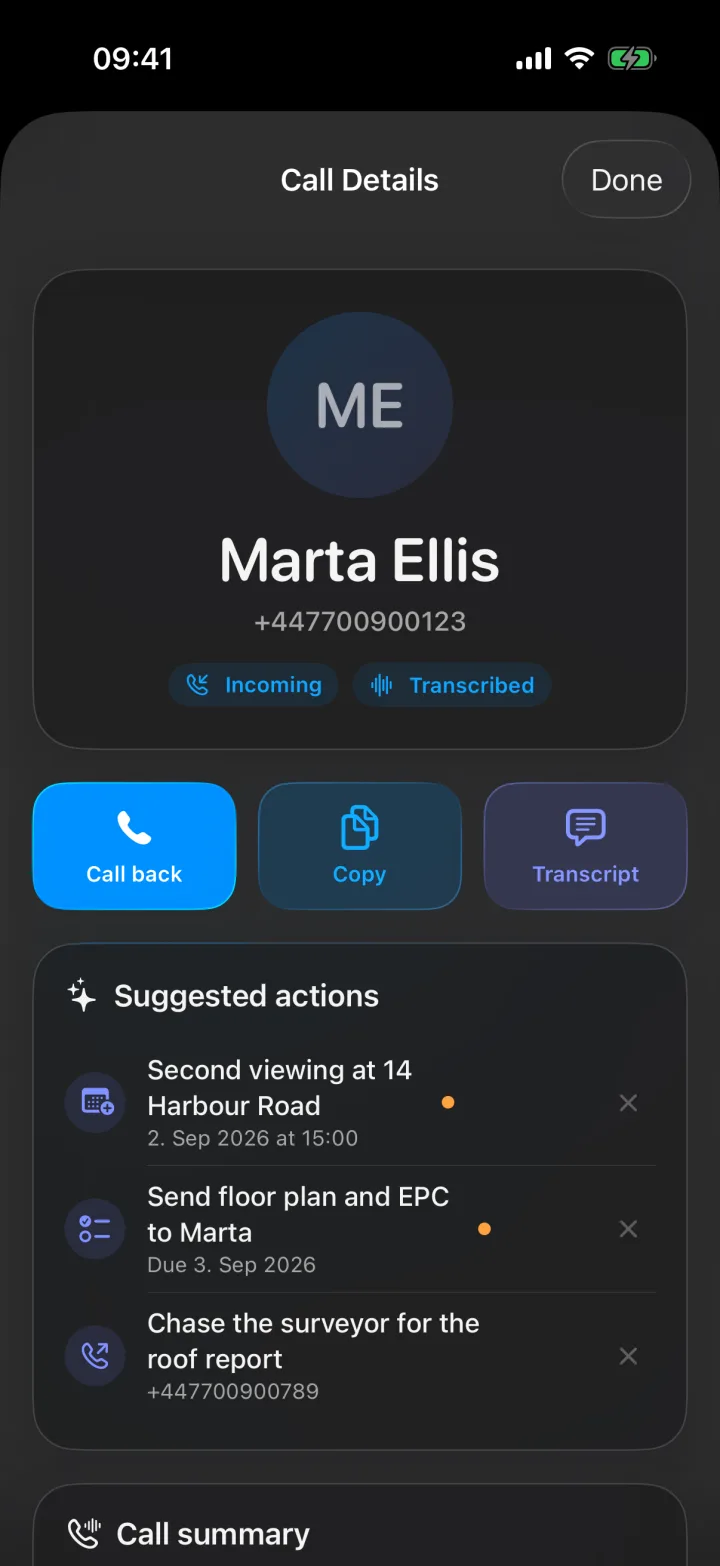
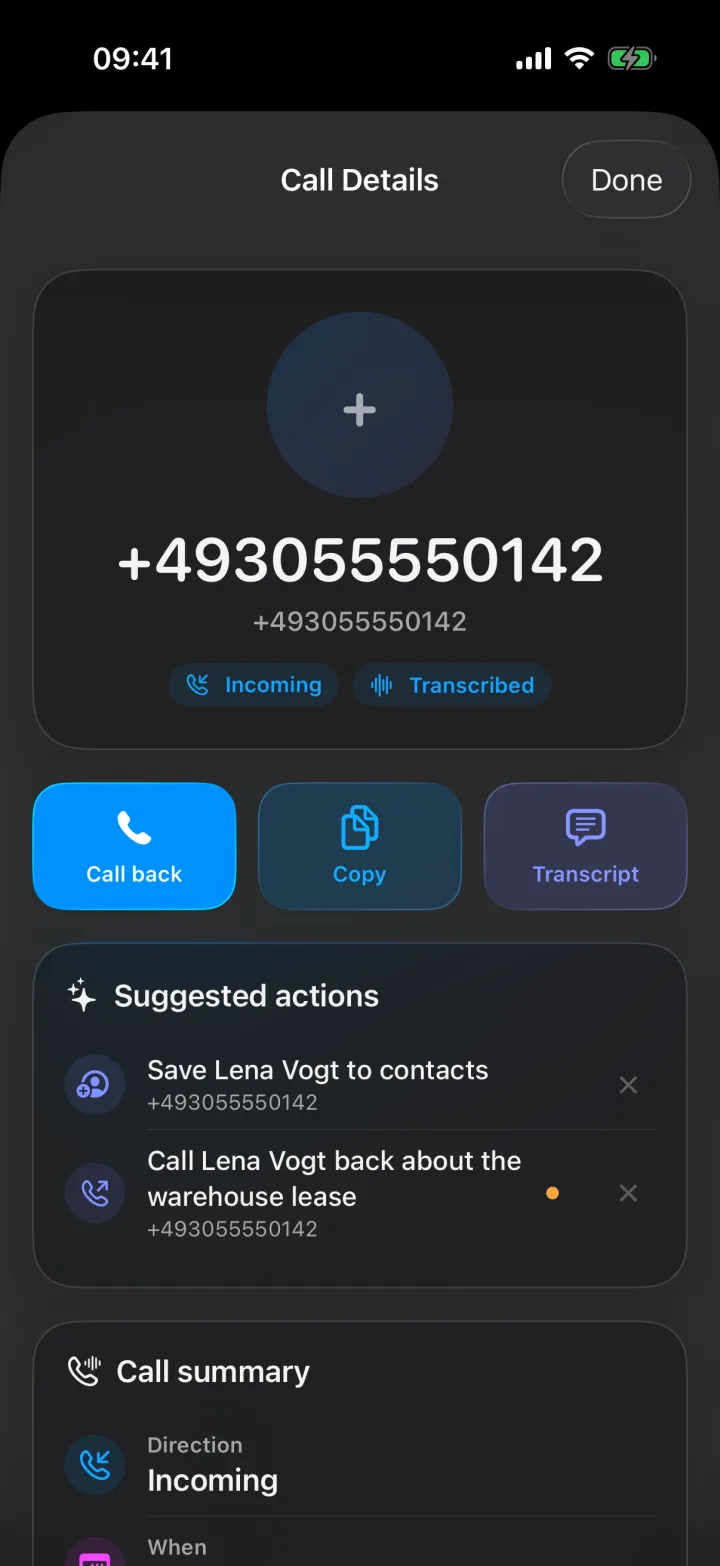
After a call, Superscribe reads the transcript and suggests up to four things to do. Each suggestion is one of these five kinds:
- Call back. You promised to call the person back, or someone else needs a call. Tap it to make the call from the app.
- Calendar event. A date and time were agreed on the call. Tap it and a calendar event opens, already filled in. You check it and save it.
- Reminder. Someone made a promise, for example “I will send you the floor plan”. Tap it and it goes into the Reminders app, with the due date if one was mentioned.
- Save contact. The caller is not in your contacts, and their name was said on the call. Tap it and a new contact opens with the name and number already filled in.
- Checklist. Someone listed several things, for example the documents a buyer still needs. Tap it and the list becomes its own list in the Reminders app, with one item for each entry.
Nothing happens until you tap it. You can also dismiss any suggestion you do not need.
A countdown to the meeting you agreed on
Many calls end with a time. “Let’s meet at three this afternoon.” When a call ends with a meeting to add to your calendar, the card on your iPhone lock screen now counts down to it and shows the time it starts. On iPhones with a Dynamic Island, the countdown is shown there too.
Tap Open to go to the call, and one more tap opens the calendar event, already filled in.
Reminders do not get a countdown. Their card shows Due today, Due tomorrow, or the day or date the reminder is due. After that day it shows Was due yesterday, and then Overdue. Tap Create reminder to put it into the Reminders app.
The card appears after calls where something is due soon, like a meeting today or tomorrow. You can change this in the app’s Settings, under Notify me.
Read more about it in Your Lock Screen Counts Down to the Meeting You Agreed On.
The simple rule
After every client call, ask one question:
Where did the next action go?
If the answer is “it is in my head”, it is not saved.
If the answer is “it is somewhere in the transcript”, you will still have to look for it.
If the answer is “it is in my calendar, my reminders, my call list or my CRM, where I will see it”, the call is done.
A transcript tells you what happened.
A list of action items tells you what to do next.
If client calls keep leaving you with forgotten follow-ups, see how Superscribe handles calls: superscribe.io/calls