Phone Call Notes vs Meeting Notes

Phone call notes and meeting notes can look like the same thing.
Both start with a conversation. Both can have a transcript, a summary, decisions and action items. Software can help with both.
But they are used in different ways.
Meeting notes are usually about a planned event. There is a calendar invitation, a known group of people, a topic, and a shared record that people may read later.
Phone call notes are different. The call is often not planned. The client, the property, the candidate or the deal is already stored somewhere else, for example in your CRM. What you need from the call is not only a record of what was said. You need to know what to do next.
That difference changes what kind of notes, and what kind of tool, you need.
When calls create work
Get a summary and action items from every business call
Superscribe Phone records calls on the number you already have. After each call you get a transcript, a short summary and a list of suggested next steps.
The short version
Use meeting notes when you need to remember the meeting itself.
Use phone call notes when the call creates work that has to be done somewhere else.
Meeting notes answer these questions:
- What happened in this meeting?
- What did the group decide?
- Which action items came out of it?
- What should the people who were there be able to read later?
Phone call notes answer these questions:
- Who called?
- What changed because of the call?
- What needs to be updated now?
- Which call back, appointment, reminder or CRM note should come out of it?
Meeting notes are a record.
Phone call notes are a list of things to do.
Meeting notes are built for shared memory
Good meeting notes help a group agree on what happened.
They usually include:
- who was there
- the agenda
- the main points of the discussion
- decisions
- problems that block progress
- action items
- who does each item
- deadlines
- links or documents
This works well for team meetings, client reviews, interviews, planning meetings and regular check-ins.
Meeting notes are most useful when several people will read them after the meeting. A good summary is easier to read than a full transcript, and it helps everyone remember what was agreed.
Tools for meeting notes often focus on planned meetings, the calendar, shared summaries, transcripts you can search, and working on the notes together.
That is useful. It is also different from the work that comes out of a phone call.
Phone call notes are built for follow-through
A phone call often does not need a nice shared summary.
It needs a clear next step.
A buyer calls to ask for a second viewing. A candidate calls to say they have another offer. A client asks to change the terms. A landlord confirms a date. A colleague calls because something is blocked.
In each case, the question is not only “what happened?”
The questions are:
- What should be done now?
- Where should this information be saved?
- Who does the next step?
- What will I need to know about this later?
- Does this change the price, the terms, the deadline or the risk?
That is why phone call notes need a different structure.
A practical comparison
| Question | Meeting notes | Phone call notes |
|---|---|---|
| Usual setting | Planned meeting | Planned or unplanned call |
| Main job | Shared record | List of next steps |
| Most useful result | Summary, decisions, action items | Call back, appointment, reminder, CRM note |
| Main risk | People forget what was agreed | A promise is forgotten after the call |
| Who usually writes them | The organiser or the people in the meeting | The person on the call: agent, recruiter, broker, consultant |
| Where they should be saved | Shared document or meeting record | CRM, calendar, reminders, client file |
| What matters most | Everyone agrees | The work gets done |
One is not better than the other.
Meeting notes are better when the record of the meeting is what you need.
Phone call notes are better when the call starts other work.
Where normal meeting-note software falls short for phone calls
Meeting-note software can still help with calls.
If it gives you a clear transcript and summary, that is better than trying to remember everything.
The problem comes after that.
Many meeting-note tools send a bot into a video meeting. A normal phone call has no meeting link, so there is nothing for the bot to join.
And information from a phone call usually has to go somewhere:
- a buyer’s call to a new viewing in the calendar
- a candidate’s call to notes in the candidate file
- a client’s call to a follow-up that you write
- a landlord’s call to a reminder with a date
- an unknown caller to a new contact
- any business call to a note in your CRM
A meeting-note tool may give you a good summary and still leave all of this to you.
You still have to decide what goes into the CRM, what goes into the calendar, what you need to write to the client, and what you need to remember.
That is the part that takes time.
The transcript exists.
The work still has not been done.
Conference calls and dial-in calls
Some conversations are both a call and a meeting. Part of the group sits in one room, and one or two people join by phone. Or you are on a video meeting on your computer. This is where many people search for conference call notes, because neither a phone recorder nor a meeting bot handles it well.
Superscribe covers both cases.
An in-person meeting with people dialled in
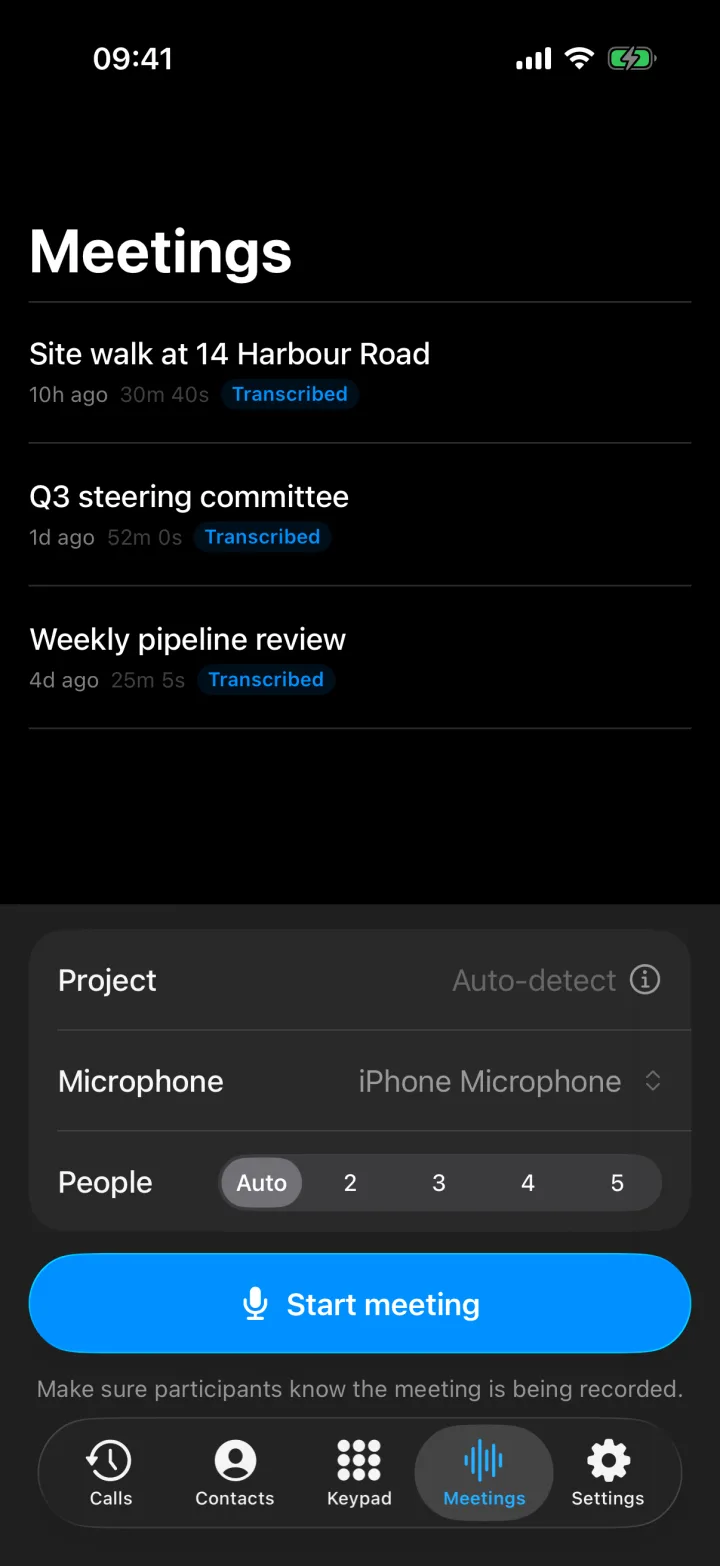
In Superscribe Phone on iPhone, open Meetings and tap Start meeting. The phone records the room. If someone is not there, you can dial them into the meeting from the app. They hear the room, the room hears them, and the meeting keeps recording.
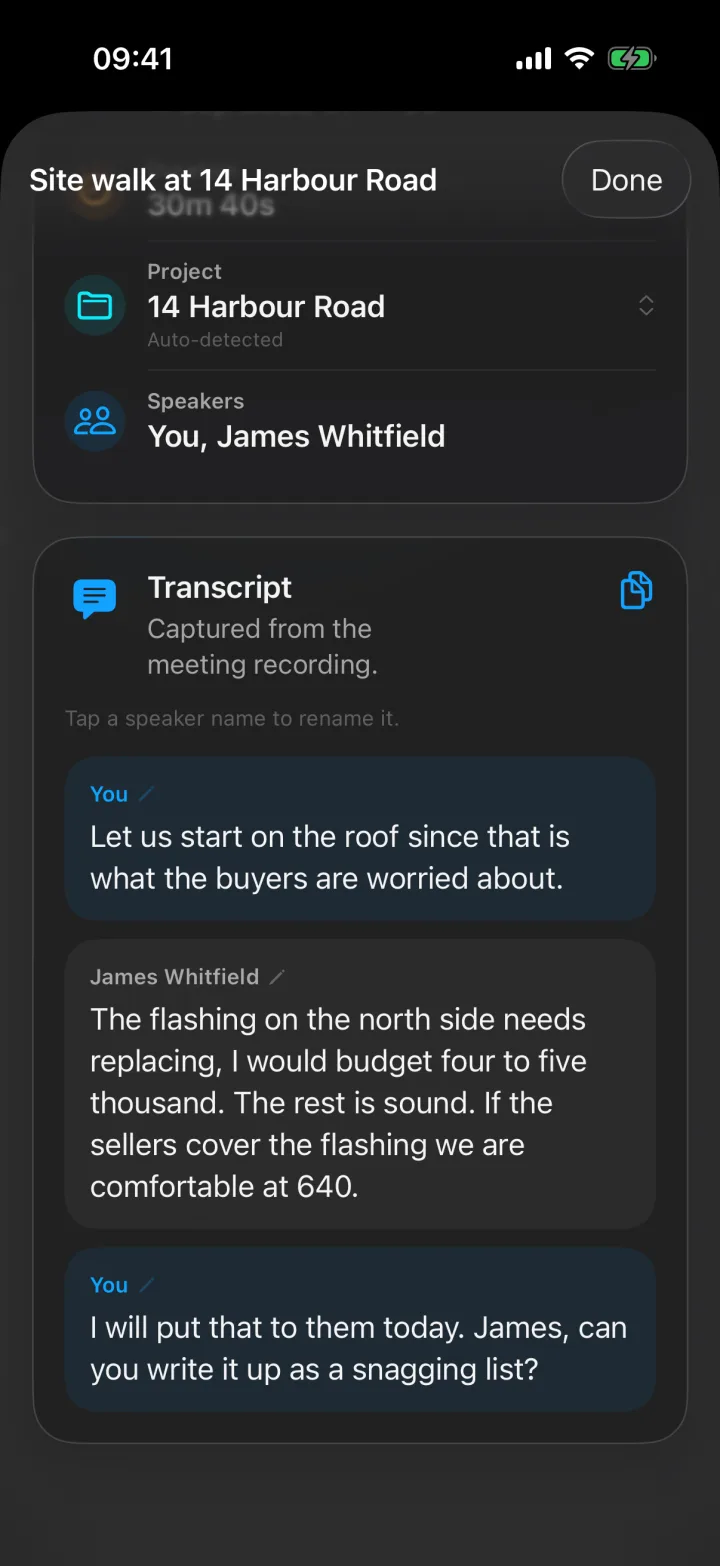
When the meeting ends, everyone is in one transcript. Voices are separated automatically. People you dialled in get their name from your contacts, and you can tap any speaker’s name to change it.
Dialling people into a meeting needs the Business Voice or Sales plan.
A video meeting on your computer
The Superscribe desktop app for Mac and Windows records a video meeting you are already in. It records what your computer plays, which is the other people, and your microphone, which is you. No bot joins the meeting, and there is no link to paste. It works with any meeting app.
When you end the meeting, you get a transcript with each speaker named, a summary and the follow-ups.
Meeting recording needs a plan with the phone features: Starter, Business Voice or Sales.
Tell people you are recording
Superscribe does not play any recording message to the other people, and that includes people you dial in. If the law where you work requires it, tell them that you are recording the meeting or the call.
What good phone call notes should capture
Good phone call notes should be shorter than a transcript and more useful than a summary.
They should include the following.
Caller and context
Who called, why they called, and which client, property, candidate or deal the call is about.
Decision or outcome
What changed because of the call.
For example:
- the buyer wants a second viewing on Thursday
- the candidate has another offer and needs an answer by Friday
- the client accepted the lower fee
- the seller will not agree before the survey is done
Next action
The next action should be clear enough that you can do it without thinking about it again.
Not clear enough:
- follow up
Clear:
- send the floor plan and the energy certificate to Marta by Wednesday
Destination
Every call note needs a place where it will be used.
For example:
- a note in your CRM
- an event in your calendar
- a reminder with a date
- a new contact
- the client or candidate file
- a follow-up that you write
If there is no destination, the call note becomes one more thing you have to sort out later.
Review
Notes written by software should always be checked.
That is true for meeting notes and for phone call notes. It matters even more when a call note becomes an appointment, a reminder or something you tell a client. A wrong action item that looks correct is worse than no action item.
When meeting notes are the better fit
Choose meeting notes when:
- the meeting was planned
- several people need the same record
- the transcript or the summary will be useful later
- the people in the meeting need to see the action items
- the conversation belongs in a shared document
- the meeting itself is what you need to remember
That is why meeting-note tools are popular for team meetings, client reviews, interviews, weekly check-ins and planning meetings.
If what you need is a clear record of the meeting, start there.
When phone call notes are the better fit
Choose phone call notes when:
- the call changes an appointment, a deal, a client file or a price
- the useful result belongs outside a notes app
- the call was not a planned meeting
- a fast follow-up matters
- the person who takes the call also has to do the work
- you want to spend less time remembering what was said
In these cases, phone call notes should lead to action.
Not only “this is what was said.”
But “this is what to do next.”
A simple template for phone call notes
Use this when a call creates work:
Caller:
Client / property / candidate / deal:
Reason for the call:
Decision or outcome:
Next action:
Who does it:
Due date:
Where this should be saved:
Price, fee or terms:
Risks or open questions:
Use this when the conversation was more like a meeting:
Meeting:
People there, and people who joined by phone:
Topic:
Summary:
Decisions:
Action items:
Who does each item:
Deadlines:
Links:
The two templates overlap. That is fine.
Meeting notes are about the meeting.
Phone call notes are about the next step.
Where Superscribe fits
Superscribe is built for people who do a lot of their work on the phone.
Superscribe Phone is an iPhone app. You keep your own number and your phone company. You set up call forwarding once on your iPhone, and your calls then ring in the Superscribe Phone app. Calls you make from the app are recorded too.
After each call, you get a transcript, a summary and a list of action items. The app can also suggest a call back, a calendar event, a reminder, a new contact or a checklist. You write any follow-up yourself, with everything you need in front of you.
The same app records in-person meetings, and the desktop app records video meetings, as described above. If you use Pipedrive, calls and meetings can be saved there as activities.
Superscribe does not play any recording message to the other person. If the law where you work requires it, tell them that you are recording the call.
This does not mean every meeting-note tool is wrong. If what you need is a shared record of meetings, a meeting-note app can be the right choice.
If what you need is to turn calls into next steps, use a tool made for calls.
Related reading
- Phone Call Notes for Freelancers
- Phone Call to Task List Automatic
- Call Notes That Go Straight Into CRM
- Record a Meeting on iPhone and Get Minutes
- Record the Meeting You Are Already In, on Your Mac
- Granola Alternative for Client Follow-Up
- Fireflies Alternative for Work You Can Use
Frequently asked questions
Are phone call notes the same as meeting notes?
No. They overlap, but they are used differently. Meeting notes are usually a shared record of a planned meeting. Phone call notes usually need to turn a conversation into next steps, such as a call back, an appointment, a reminder or a CRM note.
Can meeting-note tools handle phone calls?
Sometimes. A transcript and a summary help. The question is whether you still have to work out the next steps yourself. Many meeting-note tools also need a video meeting link, and a normal phone call does not have one.
How do I take notes on a conference call?
Record the call so that everyone is in one transcript, with each speaker named. In Superscribe Phone you can start a meeting and dial people in, and the desktop app for Mac and Windows records a video meeting you are in without a bot. Then check the summary and the action items. Tell the other people that you are recording, if the law where you work requires it.
What should phone call notes include?
At least: who called, what the call was about, the decision or outcome, the next action, who does it, where it should be saved, and any change to the price, fee, terms or deadline.
When should I use a meeting notes app instead?
Use a meeting notes app when several people need a shared record of a meeting, the calendar event is what matters, and the notes are mainly for reading and agreeing on what happened.