Best Call Notes App for Business Calls and Consultants
If you are looking for a call notes app for business calls, first decide which calls you mean. Most note-taking tools are built for video meetings. You share a link, a bot joins the meeting, and it writes up what happened. That does not help with the call you take in the car, the client who rings your mobile at four in the afternoon, or the number you call back from a car park. Those are business calls too, and they are the ones nobody writes up.
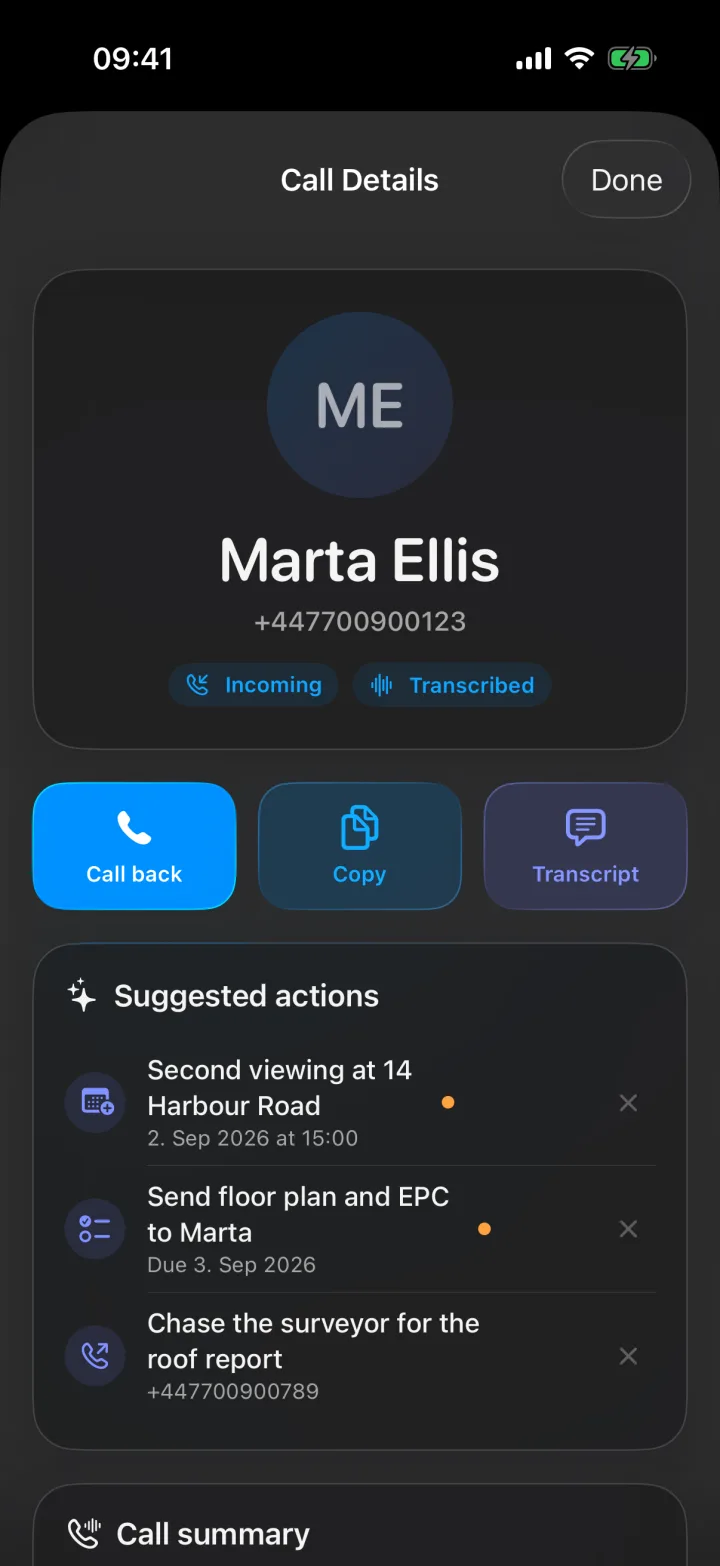
For those calls, the notes have to come from the phone itself. That is what Superscribe Phone does. You keep your own number and your own phone company, and there is no bot and no new phone system. When you hang up, the call has a transcript, a title, a short summary and a list of suggested next steps, each one a single tap to confirm. I built it because I kept losing the useful part of client calls somewhere between the call and my desk, and every tool I tried wanted a meeting link I did not have.
For the calls a bot cannot join
Business call notes on your own number
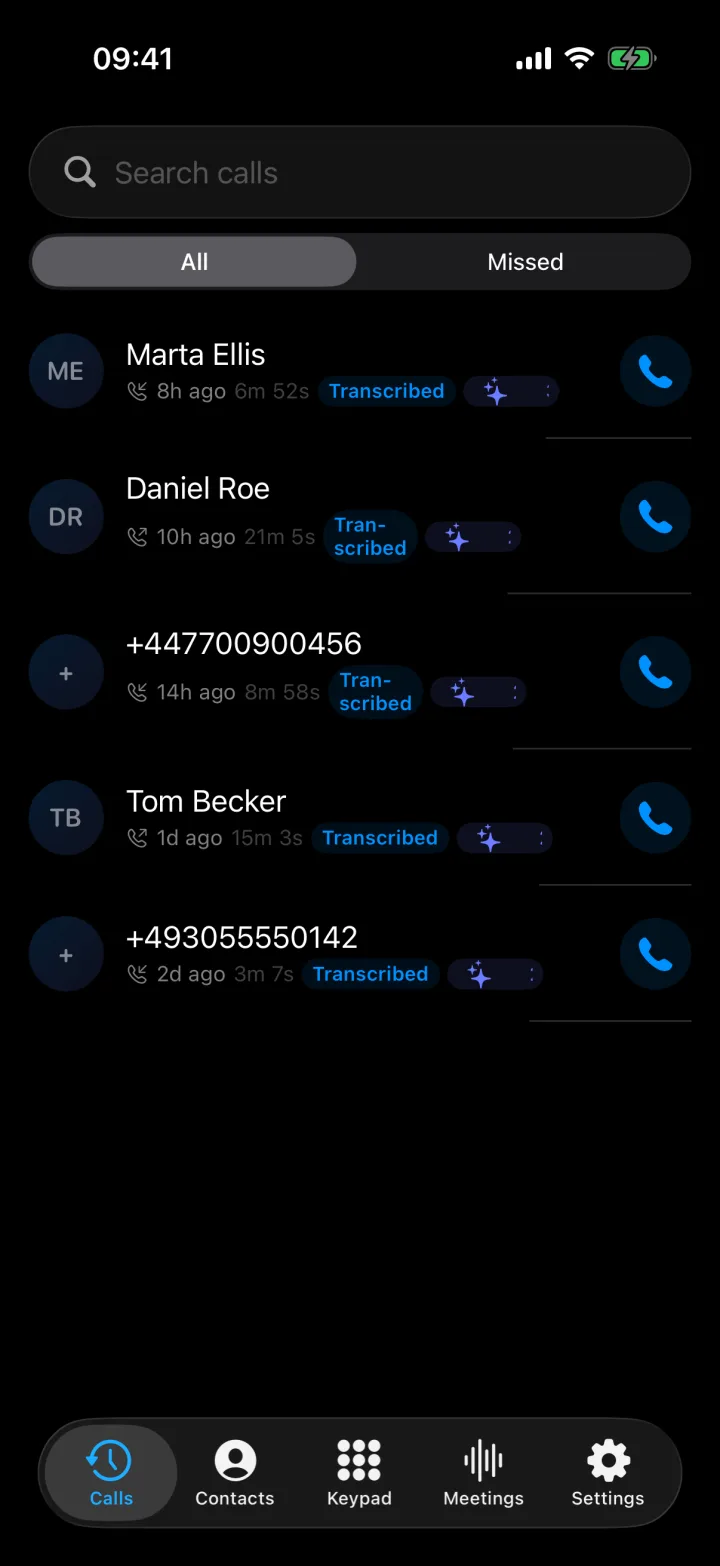
Superscribe Phone transcribes the call on your iPhone and gives you the summary and the next steps when you hang up.
What a call notes app for business calls has to do
It has to do five things, and most tools do only two of them.
Work on ordinary phone calls. Incoming and outgoing calls, on the number your clients already have saved. The other person does not need to install or set up anything.
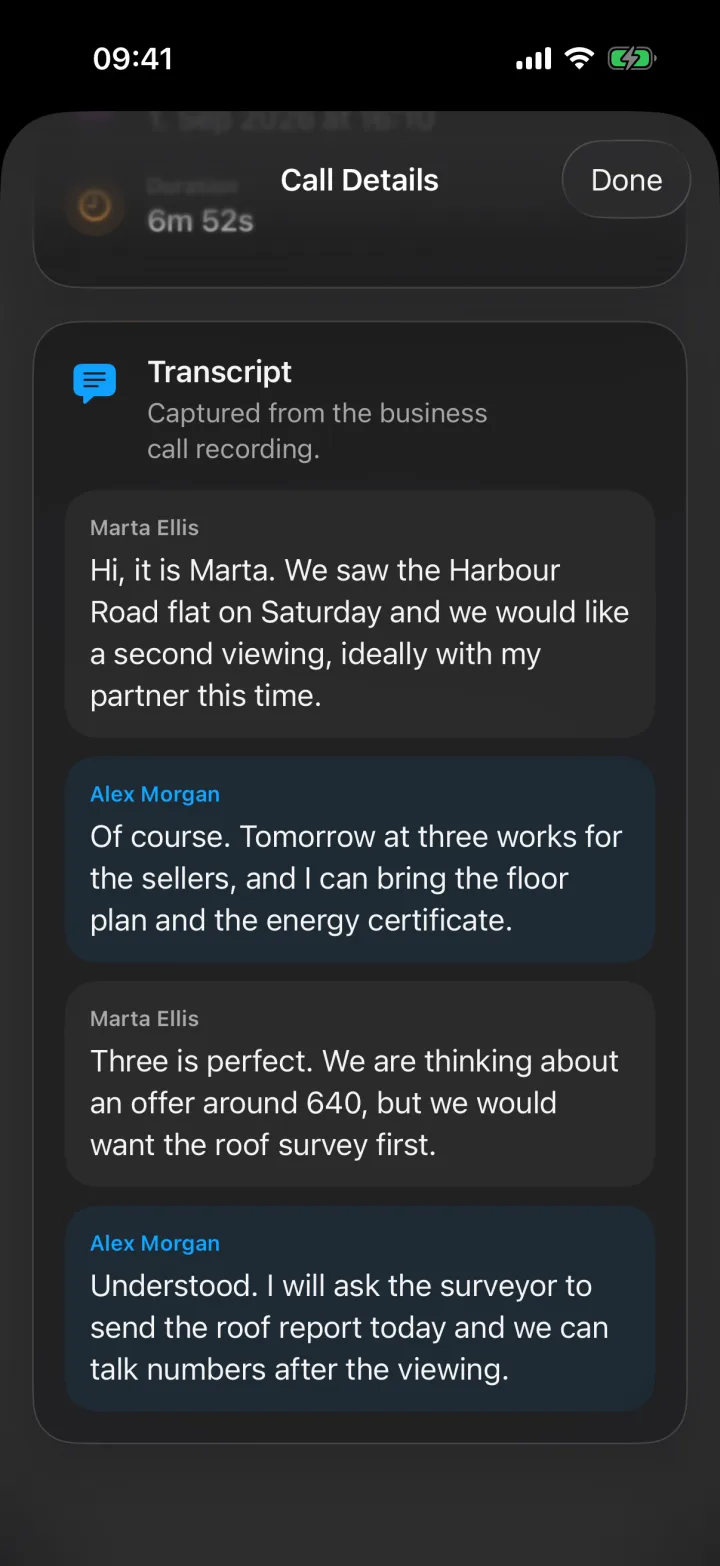
Write down what was actually said. The transcript shows who said each line, so you can check the exact words when a client later asks what you agreed.
Give you something short enough to read. A title and a summary, so you can see what the call changed without reading the whole transcript.
Suggest the next step, but not take it. After the call, Superscribe can suggest five kinds of action: call someone back, add a calendar event, create a reminder, save an unknown caller as a contact, or save a list you talked through as a checklist in Reminders. Each one waits for your tap. You can also get a notification with a button on it, so you can create the reminder from the lock screen without opening the app.
Put the call where your records are. If you connect Pipedrive, each business call is logged against the person with the same phone number, as a completed activity with the summary, the key details, the next steps and the transcript. If the call ended with a clear next step but no agreed time, you also get a follow-up task. If you agreed a date and a time, you get a meeting activity. When Pipedrive does not know the number, the call waits for your review before a new person is created, unless you have already approved that contact.
One thing it does not do: it does not write or send emails or messages. After each call, Superscribe gives you a summary and a list of action items. You write the follow-up yourself, with everything you need in front of you.
How it works with your own number
You do not get a new number, and you do not move your number to another phone company. You set up call forwarding once on your iPhone. The app gives you a short code to paste into the Keypad, you press Call, and your phone company confirms it. After that, all your calls ring in the Superscribe Phone app instead of the normal phone screen. If you are signed in to the Superscribe app on your Mac or Windows computer, they ring there too, and you answer wherever you are.
Your clients dial your normal number and hear a normal ringing tone. When you call out from the app, they see your own number once you have verified it in Settings. If you do not answer, the call is saved as a missed call. There is no voicemail.
Superscribe does not play any recording message to the other person. If the law where you work requires it, tell them that you are recording the call.
Consultant call notes: what needs to be in them
A consultant call is rarely only a conversation. It is part of delivery, sales, onboarding or advice, and it creates obligations. The note is only useful if it records those obligations.
- what the client asked for
- what was agreed, kept apart from what was only discussed
- what changed in scope, priority or timeline
- who owns the next step, and by when
- what the delivery team needs to know before they start
- what belongs in the client record
That is the difference between a note that says what happened and a note that says what happens next. A transcript alone gives you the first. You still have to work out the second yourself, often at seven in the evening, after four more calls.
This is why the best app for consultant call notes is not the one with the nicest transcript. Consultants do not deliver transcripts to clients. They deliver decisions, recommendations and next steps. A transcript is raw material. The useful app is the one that leaves you with the least work after the call.
Meetings in the room and on video
Consultants also spend time in meetings, so meetings are covered too. Tap Start meeting in Superscribe Phone and the iPhone records the room. The app reminds you to make sure everyone knows the meeting is being recorded. Speakers are separated automatically, and they often get their real names when they introduce themselves or are called by name, so the notes do not just say “Speaker 3”. When you stop, the summary, the decisions and the next steps are ready. On Business Voice and Sales, you can also add someone by phone who is not in the room, and what they say goes into the same transcript.
For video meetings, the Superscribe app for Mac and Windows records the meeting you are in from your own computer. No bot joins the call. The recording is saved to your account as a meeting, next to the ones you record on your iPhone.
If a notetaker that only joins when there is a calendar invite has let you down before, call notes without a meeting bot explains why that gap exists.
Time spent per client
Many consultants bill by the hour, and client calls are billable work that often goes unrecorded. Once you have added your client projects, Superscribe tries to file each call to the right one based on what was said, so the time you spent on the phone with a client is recorded without a timer. Dictation on your Mac or Windows computer is filed the same way. On Business Voice and Sales, you also get billable call records by client and project.
How to Track Client Work Without Timers explains this in more detail.
Is this a call notes app for sales reps?
For some sales reps, yes. For others, no.
It fits reps whose calls happen on their own mobile number: first calls with a new client, callbacks, and clients who ask you to ring them back. The call is transcribed, summarised, filed to a project and, if you use Pipedrive, logged there, so the client record is up to date the same day. Superscribe never changes your deals, stages or deal values. Pipedrive is the only CRM with a ready-made connection. On Business Voice and Sales, your own software can also read your calls and notes, but someone has to set that up.
It does not fit a sales team that works from a dialler. Superscribe does not score calls, measure how much each person talks, produce coaching reports or forecast sales. It is also not a phone system: there are no extensions, no phone menus and no call routing. If your team works inside Salesforce or HubSpot with a call analysis tool attached to the dialler, that tool does things Superscribe does not do. Choose that instead, or use both for different jobs.
For the CRM side, Call Notes That Go Straight Into CRM shows what reaches the client record.
Call notes software compared
Much of the confusion here comes from comparing tools as if they record the same kind of conversation. They do not.
Otter, Fireflies and Fathom are built around video meetings. A notetaker joins the meeting and writes it up for you and your team. If most of your conversations are video meetings with a link, they do that job well. They are not built for a client who calls your mobile. The Otter alternative for consultants page compares the two in more detail.
Granola records on your computer while you type your own notes. It works well if your day happens at a desk with the laptop open. It helps less when your phone rings while you are between clients.
Superscribe covers phone calls on your own number and meetings in the room with Superscribe Phone, and video meetings with the app for Mac and Windows, without a bot. It also includes dictation on Mac and Windows, so you can type by talking in any app.
So choose by where your conversations happen, not by the length of the feature list. Plenty of people use a meeting notetaker for scheduled video calls and Superscribe for their phone calls, and that is a sensible choice.
The limits, in one place
- Superscribe does not write or send emails or messages.
- Phone calls are captured by Superscribe Phone on iPhone. There is no Android app.
- Once forwarding is on, all your calls go to the app. You can turn forwarding off again with a code.
- No new number, no moving your number, no extensions, no phone menus and no call routing.
- No voicemail. Unanswered calls are saved as missed calls.
- Suggested actions on your phone always wait for your tap.
- Pipedrive is the only CRM with a ready-made connection.
- Calls need a paid plan. There are no free minutes.
- If your firm uses a set format for minutes, a person still applies it. You get a transcript with names, a summary and a list of decisions to work from.
What it costs
Superscribe Phone is free to download from the App Store. Calls need a paid plan, from €49 a month, with a 30-day money-back guarantee on your first month.
Starter, at €49 a month, includes 600 minutes a month, of which up to 100 can be outgoing. It also includes meeting recording, Pipedrive and dictation on Mac and Windows. Business Voice, at €99 per seat a month, adds three things: you can add people to your calls and meetings by phone, you get billable call records, and your own software can read your calls and notes. Prices are before VAT, and yearly billing saves 15%.
A buying test
Before you choose any tool in this category, ask:
- Where do my calls actually happen: a meeting link, my mobile, or a room?
- Does the tool record that kind of call, or only the kind I have least often?
- Does it separate decisions from discussion, or only give me a transcript?
- Are the next steps linked to a person and a date?
- Does the result reach my CRM, or does it stay in another app I have to remember to open?
- Is it clear about what it does not do?
The last question matters more than it seems. Checking notes is always faster than rebuilding them from memory, but only if you know which parts you still have to write yourself.
Try it on your next real call
Install Superscribe Phone, set up forwarding, take your next client call as usual, and read the summary before you start the car. If the useful parts of the call are already where they need to be, you have your answer.
For the full picture of phone call notes, start at the call notes hub or read call notes for consultants. If action items are your main problem, How to Never Lose an Action Item From a Client Call goes deeper.
Frequently asked questions
What is the best app for consultant call notes?
It depends on where your calls happen. For video meetings with a link, a meeting notetaker works. For client calls on your own mobile number and meetings in the room, you need an app that works on the phone itself, such as Superscribe Phone.
Is Otter good for consultant call notes?
Yes, if most of your calls are video meetings and you mainly want transcripts you can search. It is less useful for calls that come to your mobile number.
What should consultant call notes include?
A short summary, what was agreed, who does what and by when, and a record you can find later. The full transcript is useful when you need to check the exact words.
Does Superscribe write the follow-up email?
No. You get the summary and the action items, and you write the follow-up yourself.
Does the other person know the call is recorded?
Superscribe does not play any recording message. If the law where you work requires it, tell them yourself.