Superscribe Lite: Free Offline Dictation
Superscribe Lite is the version I can describe in one sentence: free offline dictation for Mac and Windows, with no account and no connection to Superscribe.
You install it, download a speech model, press the shortcut and talk. The words appear where your cursor already is while you are still speaking.
Version 0.3.1 is available now for macOS and Windows.
Why make a separate Lite edition
Superscribe began as a cloud dictation app. The cloud version can detect languages automatically, clean up text, apply templates, keep history and connect the spoken work to projects and time tracking. That is useful, but it is more product than some people want.
Sometimes you just want the microphone to type.
I wanted an edition that did not start with a registration form, a trial clock or a privacy explanation. Superscribe Lite has no sign-in because it has no Superscribe account to sign in to. Recognition runs on the computer. Your audio and text are not sent to us, recorded in an account or added to analytics.
That boundary is also why it is a separate download. “Local mode” hidden inside a cloud product is easy to misunderstand. Lite has one engine and one promise.
Streaming text, not a voice memo
Offline dictation often feels like recording a voice note. You talk for a while, stop, wait, then discover the model misunderstood the important word near the beginning.
Lite streams the words into the current field as you speak. Use it in an email, a document, a message, an issue tracker or a browser compose box. If a word is wrong, you see it while the sentence is still in your head.

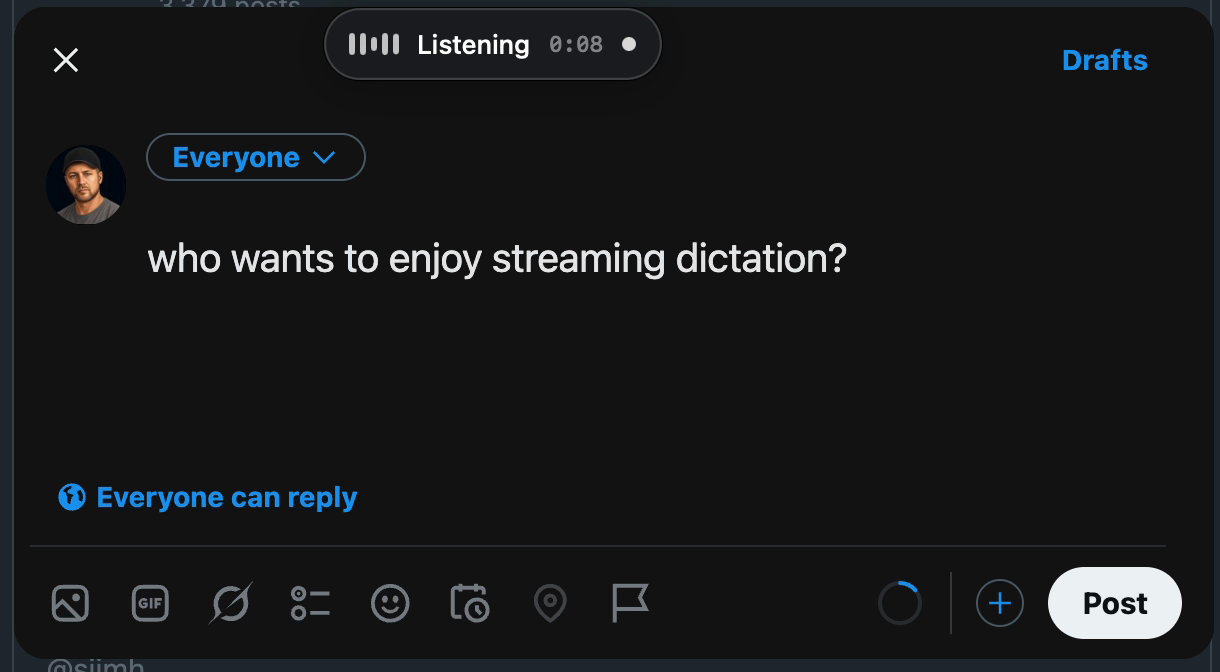
The small pill follows the caret. It shows that Superscribe is listening, the elapsed time and the selected language without covering the paragraph you are writing.
A 20-second real demo
This is the rough screen recording I made while testing it in an X compose box. It shows live insertion, the cleanup controls and a switch from English to German and French.
One honest detail: I dictated the name as “Superscribe Light” in that first recording. The product is Superscribe Lite. The typo stayed in the demo because the recording also proves the useful bit: these are the words produced on the machine, not a polished mock-up.
What works offline
The core path does not need the internet after its speech model is installed:
- Pick the local model for the language you speak.
- Hold the dictation shortcut, or tap it for hands-free recording.
- Speak and watch the text arrive at the cursor.
- Stop and keep working in the same app.
There are ten on-device language options at launch, including Estonian. Models are downloaded separately so the installer does not carry several gigabytes of speech data you may never use. Some language models come directly from their publisher after Lite shows the source and licence.
The app works offline after the model is present. No subscription is required.
Optional cleanup is your choice
Raw local speech recognition is deliberately the default. Lite can also remove filler words, fix punctuation or rewrite the result in a shorter, formal, friendly or cleaner style.
That step is optional and uses an API key you provide, such as your own Claude key. The key stays in the operating system’s credential store. If you do not enable cleanup, the local transcript never leaves the computer.
This distinction matters. On-device speech recognition and an optional request to a provider you chose are two different data paths, and the app labels them that way.
Mac and Windows use the same idea
The macOS and Windows editions share the same local recognition path, but they fit their operating systems.
On Mac, the default shortcut is Option+Space. The floater follows the caret, microphone choice lives in Settings, and downloaded models can be removed when you no longer need them.
On Windows, the app lives in the tray, shows whether the language model is ready and types into the focused application. The default hold-to-talk shortcut is F9.
Release 0.3.1 also fixed a small problem that was not small when it happened to your sentence: short dictations could stop before the last word had finished. The stop threshold now gives the recognizer more time, and the level meter updates quickly enough to feel connected to your voice.
Lite or the full Superscribe desktop app
Choose Lite if you want local dictation, no account and no cloud connection.
Choose the full desktop app if you also want cloud recognition, automatic language detection, managed cleanup, templates, searchable history, project context and time tracking. On-device recognition remains free there too. The paid plan covers the cloud features, not permission to use your own computer.
Phone calls and in-person meetings are a different product surface. Superscribe Phone records calls and rooms, separates speakers and turns them into summaries and suggested actions. Lite is for the words you speak at your desk.
Download Superscribe Lite
There is no signup step.
Install one speech model and dictate a sentence into the app where you normally type. If the local model is accurate enough for your voice and language, keep it. If it is not, delete it. Free should mean the test is that simple.
You can compare Lite with the cloud edition on the desktop dictation page, or read why real-time dictation feels different from record-then-transcribe.
Frequently asked questions
Is Superscribe Lite really free?
Yes. Local speech recognition has no subscription, trial clock or account requirement. Optional cleanup may cost money through the provider whose API key you add.
Does Superscribe Lite send recordings to Superscribe?
No. Lite has no account connection. Audio and transcripts stay on the machine. An optional cleanup request goes only to the provider you configure.
Does it work without Wi-Fi?
Yes, after you download the speech model you want to use. The model download itself needs an internet connection.
Is it available for Linux?
Not as a supported installer today. The current downloads are for macOS and Windows.